
MULTI-PLATFORM PROTECTION

Multi-platform protection with central management

Build consistent policies and security visibility across working environments.

Windows endpoint protection

Protect office workstations, Windows servers and store endpoints with antivirus, active defence and centrally managed policies.

Features and supported versions vary by platform. Confirm compatibility and deployment requirements with our local team.
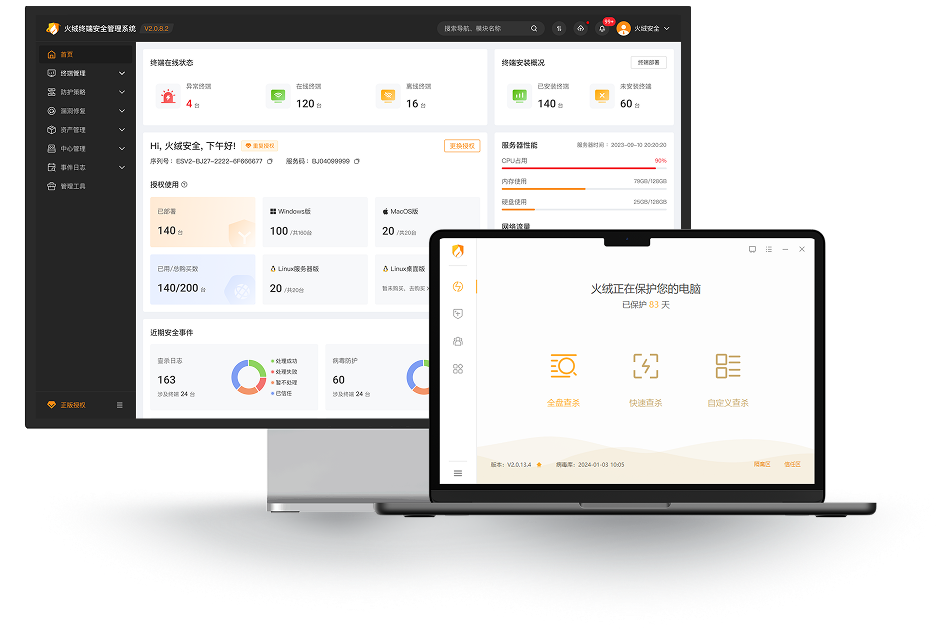
Official product interface
Official Huorong Endpoint Security Management System interface: management console and endpoint client
Official Simplified Chinese interface. Appearance and features may vary by product version.
Official product interface

Management console and endpoint client

Official Huorong Endpoint Security Management System interface: management console and endpoint client

Official Simplified Chinese interface. Appearance and features may vary by product version.

Enterprise endpoint controls

Clear visibility. Practical control.

From finding endpoints to following up risks, make everyday management clearer

01 / 2FA

Another check for Windows sign-in

Add a dynamic passcode to local or RDP sign-in, with the scope chosen by endpoint

WINDOWS SIGN-IN · 2FA
Conceptual feature illustration

Illustrative sign-in sequence

  1. Account passwordWindows account
  2. Dynamic passcodeAn additional check
  3. Computer accessContinue after verification
Before you enable it: requirements and official guidance
  • Passcodes are obtained through Huorong’s dynamic-passcode WeChat mini-program
  • Local verification disables fingerprint and PIN sign-in and requires an account password. RDP sign-in also requires the correct account password first
  • Changes take effect after policy synchronisation. Check Windows and endpoint-version compatibility before deployment
Endpoint dynamic authentication guide (original: Simplified Chinese)
02Conceptual feature illustration
PATCH MANAGEMENT

Coordinate patching

Bring patching and maintenance together, with fewer checks on individual computers

  • Vulnerability review
  • Patching tasks
  • Maintenance schedules
Features and deployment notes
  • Review by endpoint or patch type and arrange patching, endpoint upgrades and scheduled tasks
  • Suitable patches, connectivity, maintenance windows and restarts affect remediation; not every vulnerability can be fixed immediately
03Conceptual feature illustration
ENDPOINT DISCOVERY

Find gaps in endpoint coverage

Identify computers without the Huorong endpoint installed and plan the follow-up

  • Endpoint discovery
  • Deployment checks
  • Coverage follow-up
Features and deployment notes
  • Endpoint discovery identifies computers that require the Huorong endpoint but do not have it installed
  • Check the discovery scope against network and deployment settings, then confirm installation and management arrangements
04Conceptual feature illustration
DEVICE MANAGEMENT

Decide how devices are used

Apply company policies to storage, connectivity and peripheral devices

  • Allow or block
  • Selected read-only access
  • Trusted-device exceptions
Features and deployment notes
  • Manage USB storage, portable devices, USB wired and wireless adapters, printers, optical drives and Bluetooth
  • Read-only access applies to USB storage, portable devices and optical drives, not every device type. Administrators configure trusted devices and exceptions
05Conceptual feature illustration
VISUAL CONTROL CENTRE

A shared view of threats and status

Review threats and server performance in one place to guide the next action

  • Threat information
  • Server performance
  • Group policies
Features and deployment notes
  • The visual console presents threats and server performance alongside endpoint, group and protection-policy management
  • Assign permissions by role and check console and endpoint versions. The illustration is a concept, not live monitoring data
06Conceptual feature illustration
SECURITY ANALYSIS

Security analysis reports

Bring protection logs and risk details together to support hardening decisions

  • Protection logs
  • Risk analysis
  • Response advice
Features and deployment notes
  • Security reports bring together protection logs, risk details and advice for administrator review
  • Interpret reports against the actual environment and records, then confirm response priorities. The illustration shows no real report or statistics
07Conceptual feature illustration
APPLICATION CONTROL

Permit remote tools where needed

Manage application restrictions and exceptions for approved support tools

  • Execution controls
  • Selected exceptions
  • Shared policies
Features and deployment notes
  • Restrict remote-control tools through application execution policies and exempt selected tools needed for support
  • Administrators configure exceptions. Application execution controls are separate from trusted-IP protection for RDP sign-ins
08Conceptual feature illustration
REMOTE ASSISTANCE

Built-in help for everyday issues

Start desktop control or viewing from the console to assist with computer problems

  • Remote desktop
  • Screen viewing
  • User-response policies
Features and deployment notes
  • Intranet use requires connectivity between the console and endpoints and the necessary communication ports
  • Notifications, consent and timeout behaviour follow administrator policies and your organisation’s access and operating rules
HONG KONG SAR · ON-PREMISE
LOCAL DATA, LOCAL CONTROL

On-premise deployment
Keep data where you choose

Deploy the control center within your corporate network or on Hong Kong servers. Retain endpoint logs, policies and management data according to your configuration, without requiring an overseas cloud for central management.

  • Define storage locations, access permissions and retention periods
  • Confirm data flows for updates, cloud lookups and telemetry before deployment
  • Support internal governance under Hong Kong's Personal Data (Privacy) Ordinance

Private deployment supports data governance. Actual compliance depends on collection purposes, safeguards, retention and access arrangements. Deployment scope and features follow the agreed configuration and contract.

PROTECTION + MANAGEMENT

Four essentials for central management

Assets & endpoint management

Coordinate software distribution, system patching and hardware inventory to reduce repetitive tasks and improve IT operations.

Peripheral device controls

Set USB drive and external disk permissions around departmental needs to reduce malware exposure and data leakage.

Malicious URL blocking

Identify phishing sites and malicious links to reduce risks from email, attachments and suspicious webpages.

System behaviour monitoring

Behavioural analysis monitors suspicious system changes and unusual program activity to provide proactive defence against unknown threats.

ENTERPRISE EVALUATION

Evaluate protection in your environment

Our local team helps assess your needs and choose a suitable deployment.